TCGoogleMaps is a sample app that shows how we can use Google Maps SDK for iOS, Google Places API and Google Directions API to build a simple navigation app.
Search autocomplete with results sorted based on distance from your current location and relevance.
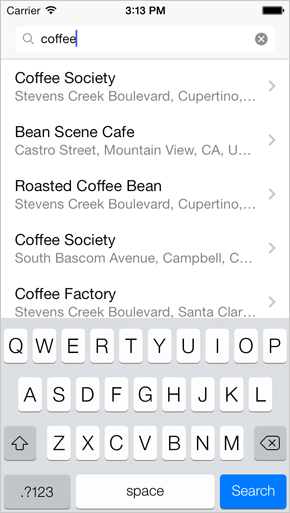
Selecting a search result will give you the directions from your location to the selected destination.
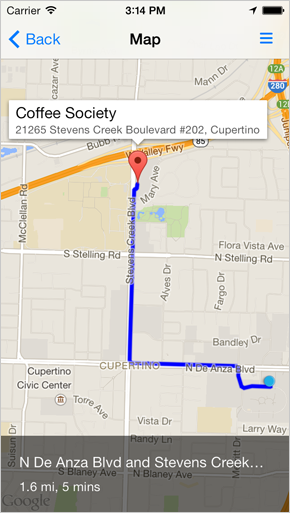
Tapping on the details icon will bring up turn-by-turn directions.
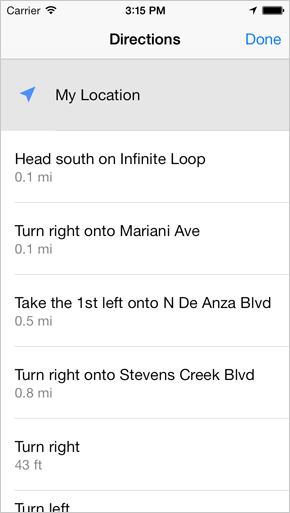
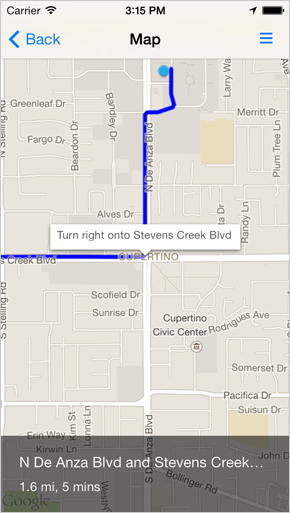
Selecting a step from the list will zoom in on that specific step on the map.
How to Build and Run
- Build Requirements
- Xcode 5, iOS 6.0 SDK or iOS 7.0 SDK, CocoaPods
- Runtime Requirements
- iOS 6.0 or iOS 7.0
Step 1: Download and Install CocoaPods
Follow the simple installation guide from http://cocoapods.org/.
Step 2: Install Library Dependencies
Run the following commands in Terminal.app:
$ cd <PROJECT_DIRECTORY>
$ pod install
$ open TCGoogleMaps.xcworkspace
Step 3: Generate your API Keys
- Go to Google API Console and generate your API key.
-
In Xcode, open
TCGoogleMaps\App\TCGoogleAPIKeys.mand replace with your own API key:NSString * const kTCGoogleMapsAPIKey = @"YOUR-API-KEY"; NSString * const kTCGooglePlacesAPIKey = @"YOUR-API-KEY";
Open Source Libraries Used
- AFNetworking - https://github.com/AFNetworking/AFNetworking
- MBProgressHUD - https://github.com/jdg/MBProgressHUD
See Also
- Google Maps SDK for iOS - https://developers.google.com/maps/documentation/ios/
- Google Places API - https://developers.google.com/places/
- Google Directions API - https://developers.google.com/maps/documentation/directions/
License
This project's source code is provided for educational purposes only. Image resources are based on the icons used in Google Maps. See the LICENSE file for more info.